Quick answer
For anything on screen, turn on Speak Screen in Settings and swipe down with two fingers. For Kindle books, use the Kindle app’s Assistive Reader. For EPUB books and free classics, leaf reads aloud for free and offline while each line lights up. If voice quality matters most and you don’t mind paying, ElevenReader’s AI voices sound the most natural.
Two kinds of voices
Every option here uses one of two kinds of voice, and that one choice decides most of the trade-offs.
Voices on your iPhone. Apple ships text-to-speech voices with iOS. They run on the phone itself, so they are free, work offline, and your books never leave the device. The default voices sound flat, but Apple’s Enhanced and Premium voices, a free download, are much better.
Cloud AI voices. Apps like ElevenReader and Speechify generate speech on their own servers with AI models. They are the most expressive voices available, especially for dialogue. The costs are that free listening is limited, the best voices are paid, offline listening means downloading audio ahead of time, and your text is sent to the company’s servers.
The options compared
| Option | Cost | Voices | Best for | Watch out for |
|---|---|---|---|---|
| Speak Screen (built into iPhone) | Free | Apple's voices, on your iPhone | Hearing almost anything on screen, in any app, with no setup beyond one setting. | A general accessibility tool rather than a reading mode: you start it with a gesture each time, and it does not keep your place in a book. |
| Apple Books | Free | Apple's voices, through Speak Screen | Books you already keep in Apple Books. Speak Screen turns the pages for you as it reads. | No read-aloud mode of its own, apart from children’s books that come with recorded narration. |
| Kindle (Assistive Reader) | Free with the Kindle app | Apple's voices, on your iPhone | Kindle books. It highlights as it reads and has speed and rewind controls. | Only for Kindle books that support it, so not your own EPUB files. |
| ElevenReader | 10 free hours a month, then $11/month or $99/year | AI voices from ElevenLabs, generated in the cloud | The most natural-sounding voices available, plus a large audiobook catalogue. | Free listening is metered. Offline listening is a paid feature, and your text is processed on their servers. |
| Speechify | Free plan, premium voices by subscription | AI voices, generated in the cloud | Documents, web pages, and study material, across phone and computer. | Built for getting through text rather than for reading books; the best voices are paid. |
| Voice Dream Reader | Subscription | Apple's voices plus optional extra voices | Long-time favourite of blind and low-vision readers, with very deep controls. | Moved from a one-time purchase to a subscription in 2024. |
| leaf | Free, unlimited | Apple's voices, on your iPhone | EPUB books and free classics, read aloud while each line lights up as you follow. | Ebooks only, not PDFs yet, and it uses the voices on your iPhone rather than cloud AI voices. |
Built into iPhone: Speak Screen
Speak Screen is an accessibility feature that reads whatever is on screen. It costs nothing and works in most apps, including Safari, Mail, Notes, and Apple Books.
- Open Settings, then Accessibility, then Spoken Content.
- Turn on Speak Screen. Turn on Highlight Content too if you want to follow along.
- Open your book and swipe down from the top of the screen with two fingers.
- Use the small controller to pause, skip, or change the speed.
In Apple Books, Speak Screen turns the pages as it reads, which makes it a decent free way to listen to a book you already keep there. It is a general tool rather than a reading mode, so you start it each time and it does not remember where you were.
Make Apple’s voices sound better
Most people judge iPhone text-to-speech by the default voice, which is the weakest one. The Enhanced and Premium versions are free and noticeably more natural.
- Open Settings, then Accessibility, then Spoken Content, then Voices.
- Choose your language.
- Pick a voice and download its Enhanced or Premium version. Premium voices are larger downloads.
Every app that uses Apple’s voices can use the ones you download, including Speak Screen, Kindle’s Assistive Reader, and leaf.
Kindle and Apple Books
The Kindle app has its own read-aloud mode, Assistive Reader. Open a book, tap the screen, tap Aa, then More, and turn it on. It highlights as it reads and has speed and rewind controls. It uses your iPhone’s voices and works with Kindle books that support it, so it will not read EPUB files you have downloaded elsewhere.
Apple Books has no read-aloud mode of its own beyond children’s books with recorded narration, but Speak Screen works well in it and turns the pages automatically.
ElevenReader
ElevenReader is made by ElevenLabs, whose AI voices are widely considered the most natural available. If you want a book to sound as close to a human narrator as text-to-speech gets, it is the one to try. It also imports PDFs, web pages, and documents, and includes a large catalogue of audiobooks.
The free plan includes 10 hours of AI listening a month, roughly one novel. Unlimited listening is part of Ultra, at $11 a month or $99 a year, and Ultra is also where offline listening lives: you download audio in advance, within a monthly allowance. Because the voices are generated in the cloud, the books and documents you import are processed on ElevenLabs’ servers.
It is designed first as a listening app. You can follow the text as it plays, but it is not trying to be a full ebook reader with reading layouts and typography. For people who mostly want to listen, that is exactly right.
Speechify and Voice Dream Reader
Speechify is built for getting through a lot of text: documents, web pages, email, and study material, on phone and computer. There is a free plan, and the more natural voices and higher speeds come with a subscription.
Voice Dream Reader has been a favourite of blind and low-vision readers for over a decade, with extensive controls over voices, pronunciation, and navigation. It moved to a subscription in 2024.
leaf
The reader that reads to you.
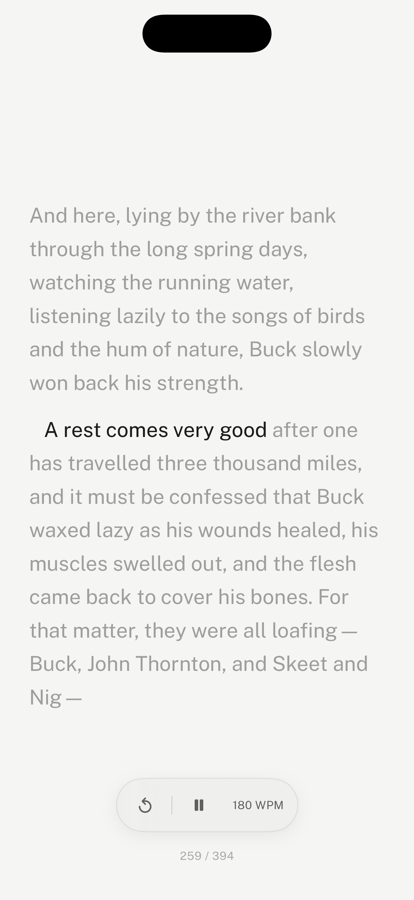
leaf is an ebook reader first. Turn on the voice in read-along and it reads the page aloud while the line you are on lights up, so you can read with your eyes, your ears, or both, and switch whenever you like.
It uses the voices on your iPhone, so narration is free and unlimited, works offline, and your books are never uploaded. It keeps reading with the screen locked, with pause, play, and skip back on the lock screen and your headphones. It picks a voice in the book’s language, and the Enhanced and Premium voices above make a real difference.
It reads EPUB and Markdown files and the 70,000+ free classics in its Explore tab. It does not read PDFs aloud yet, and its voices are Apple’s rather than cloud AI voices.
Which one to use
- Something quick, nothing to install: Speak Screen.
- Your Kindle library: the Kindle app’s Assistive Reader.
- EPUB books and free classics, read and listened to together, free and offline: leaf.
- The most natural voice, and you mostly listen: ElevenReader.
- Documents and study across phone and computer: Speechify.
- Deep accessibility controls: Voice Dream Reader.
Frequently asked questions
Can an iPhone read a book aloud for free?
Yes. Speak Screen is built into every iPhone: turn it on in Settings, then Accessibility, then Spoken Content, and swipe down from the top of the screen with two fingers to hear whatever is showing. In Apple Books it turns the pages as it goes. Reading apps such as leaf and the Kindle app also read aloud for free using the same voices built into your iPhone.
What is the most natural free text-to-speech voice on iPhone?
Apple's Enhanced and Premium voices, which are a free download. Go to Settings, then Accessibility, then Spoken Content, then Voices, choose your language, and download one marked Enhanced or Premium. They sound far more natural than the default voices, work offline, and any app that uses Apple's voices, including Speak Screen, Kindle, and leaf, can use them. Cloud AI voices like ElevenReader's still sound more expressive, but they are metered or paid.
Can I listen to a book with the screen locked?
It depends on the app. leaf keeps reading with the screen locked and shows pause, play, and skip back on the lock screen and through headphones, the same way a podcast app does. ElevenReader and Speechify also play in the background. Speak Screen is designed around what is on screen, so it is better suited to listening while the book is open.
Does text-to-speech work offline on iPhone?
Apple's own voices run on the iPhone, so Speak Screen, the Kindle app's Assistive Reader, and leaf all read aloud without a connection once the book is on your phone. Cloud AI voices need a connection to generate audio, so offline listening in those apps means downloading audio in advance, which ElevenReader includes in its paid plan.
Is text-to-speech the same as an audiobook?
No. An audiobook is a recording of a person reading, with their timing and character voices. Text-to-speech generates the voice from the text as you listen, so it works on any book you have, including free classics that were never recorded. Modern voices are good, but a skilled human narrator is still better for dialogue-heavy fiction.
Can leaf read PDFs aloud?
Not yet. Narration in leaf works with EPUB and Markdown books and the free classics in its Explore tab. PDFs keep their original page layout in leaf, so they are read visually for now. For a PDF, Speak Screen is the simplest free option.
Sources
Read it, or hear it.
Narration is free in leaf, with no hours to count and no account to make. No streaks, no goals, no ads.
Download leaf on the App Store