Quick answer
Cut the interruptions, shrink the commitment, and give yourself momentum. Turn on a Focus mode, decide to read for ten minutes rather than a chapter, and use something that keeps the text moving instead of asking you to push it along yourself.
Two different problems
“I can’t focus when I read” usually covers two things that need different answers.
The first is interruption. A phone is a reading device that also delivers messages, and every other app is one swipe away. This one has obvious fixes and most advice stops here.
The second is momentum, and it is the one people rarely name. A page of text sits perfectly still. Every bit of forward motion has to come from you, and if your attention is already frayed there is nothing pulling you along. That is why you can turn off every notification, sit in a quiet room, and still read the same paragraph three times.
What helps, and what each thing misses
| Approach | What it helps with | What it misses |
|---|---|---|
| Silence the interruptions | Notifications, badges, and other apps a swipe away | Does nothing if your attention drifts on its own, with no interruption to blame. |
| Read for a set time, not a set amount | The size of the commitment | Ten minutes is easy to agree to. A chapter is an unknown quantity. |
| Listen to an audiobook | Momentum, because a voice keeps moving whether you do or not | You are listening rather than reading, which is a different experience and a different kind of attention. |
| Read along at a set pace | Momentum while still reading the text yourself | A pace set too fast feels rushed. It is adjustable, but you have to actually adjust it. |
| Larger text, less on screen | Effort, if the type is genuinely too small | Cosmetic if the problem is attention rather than legibility. |
Read along
Something to follow.
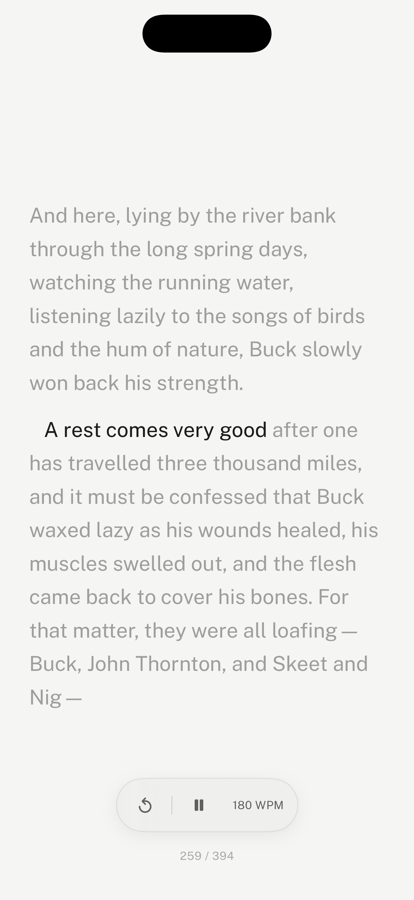
In leaf you tap play and the text starts moving at a pace you set, lighting each line as it goes. You are still reading the words yourself — but you are following something rather than pushing it.
Nothing is hidden. The lines around the one you are on stay on screen and readable, so you can glance back whenever you lose the thread, pause with a tap, or step back a sentence. That is the difference between this and speed reading, and it is the whole reason it does not cost you comprehension.
Turn on the voice and leaf reads the page aloud as the line moves. For every way to listen to a book on iPhone, see how to have books read aloud on iPhone.
What none of this fixes
If you are exhausted, no pacing will help; sleep will. If the book is genuinely not for you, finishing it is not a focus problem and putting it down is a reasonable answer. And a reading app is not a treatment for anything — if difficulty concentrating is affecting your work or your life more broadly, that is worth raising with a professional rather than solving with software.
What tools can do is make starting easier and make continuing require less of you. That is a narrow claim, and it is the honest one.
Frequently asked questions
Why is it so hard to focus when reading on a phone?
Two different problems get blamed on the same thing. The first is interruption: notifications, and every other app being one swipe away. The second is momentum: a page of text sits still and asks you to supply all the forward motion yourself. Most advice addresses only the first, which is why turning off notifications often does not fix it.
What is read-along reading?
Read-along sets a steady pace through the text and highlights your position as it moves, so the page keeps going without you having to scroll. You are still reading the words yourself, unlike an audiobook. It is the same idea as the synchronised text used in reading-support tools, where following a moving position makes it easier to stay on the line.
Is read-along the same as speed reading?
No, and the difference matters. Speed-reading apps usually flash one word at a time in a fixed position, replacing each word with the next. That removes your ability to glance back, which is something skilled readers do constantly without noticing, and comprehension tends to suffer. Read-along in leaf never hides or replaces anything: the surrounding lines stay on screen and readable, so you can look back whenever you want, and you can pause or step back a sentence.
Does leaf read books out loud?
Yes. Turn on the speaker in read-along and leaf reads the page aloud in a natural voice while the highlight follows along. It keeps reading with your screen locked, and you can pause or skip back from the lock screen or headphones. It uses the voices built into your iPhone, so it's free and works offline; Apple's Enhanced and Premium voices, a free download in Settings, sound the most natural.
How long should a reading session be?
Short enough that you will actually start. For someone who has been bouncing off books, ten or fifteen minutes is a far more useful target than a chapter, because a chapter is an unknown quantity that might run forty minutes. Momentum tends to carry you past the target anyway.
Does reading on a phone hurt comprehension?
The phone itself is not really the problem; the conditions usually are. Reading in short interrupted bursts, on a screen that also delivers notifications, is harder than reading undisturbed. Removing the interruptions and giving yourself a reason to keep going matter more than the size of the screen.
Sources
For the days you can’t settle.
Read along is free in leaf, along with the rest of the reader. No streaks, no goals, no ads.
Download leaf on the App Store