EPUB
Best default for iPhone reading apps.
Project Gutenberg EPUB files are a practical choice for apps that support imported ebooks.
Guide - Updated July 2026
A practical guide to finding free public-domain books on Project Gutenberg, choosing the right format, and reading them comfortably on iPhone.
Reviewed by the leaf team on July 15, 2026. Download and format guidance was checked against Project Gutenberg's official help pages.
Quick answer
You can read Project Gutenberg books on iPhone in Safari or download an EPUB and open it in a compatible reader. EPUB is the best default for most books. Choose leaf for built-in Gutenberg discovery and vertical-swipe reading, or Apple Books for a simple built-in import path.
Project Gutenberg on iPhone
Project Gutenberg is a free public-domain ebook library. On iPhone, you can read in the browser, download an EPUB, or use a reading app that supports imports.
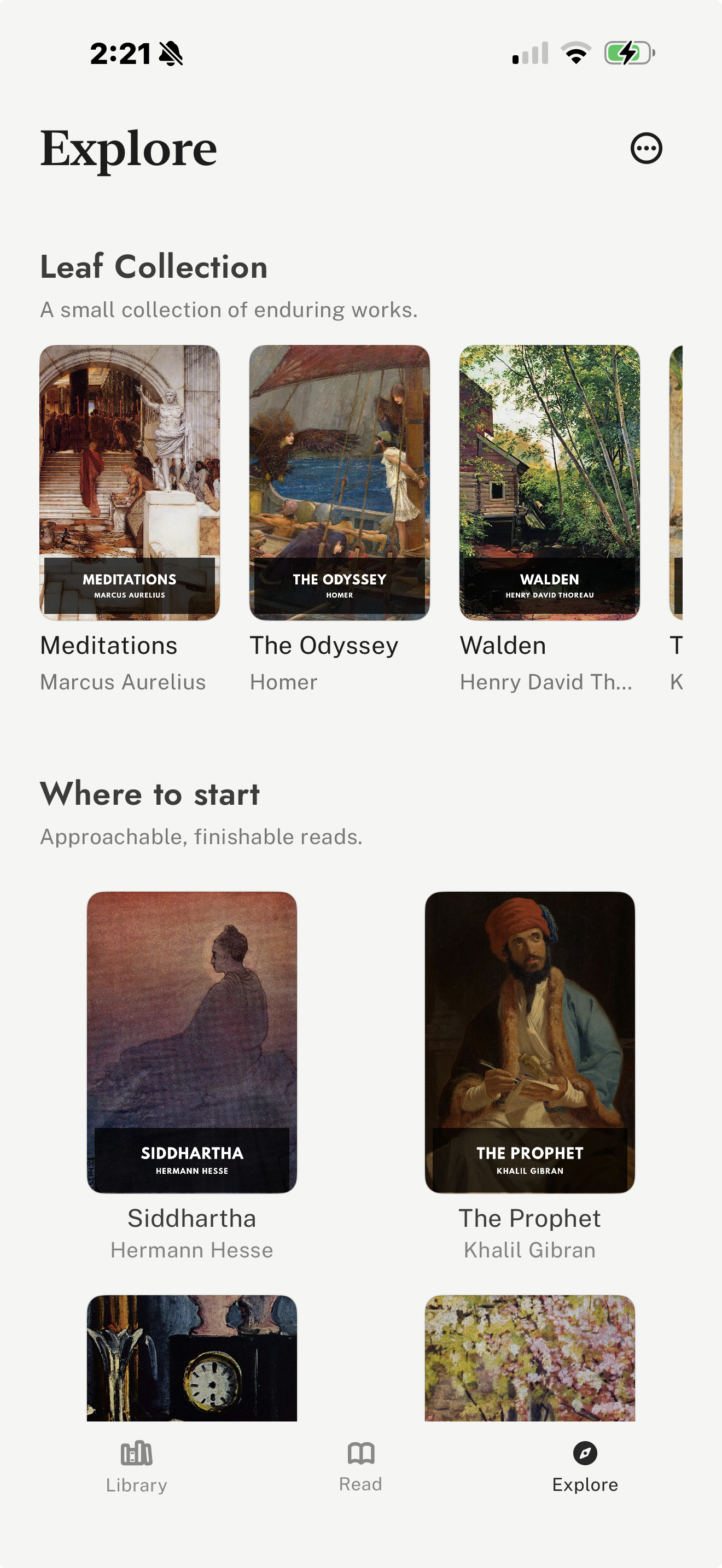
leaf is useful when you want Project Gutenberg discovery and vertical-swipe reading in the same app.
Project Gutenberg is best for free public-domain books: classics, older nonfiction, poetry, essays, and obscure works that may not be easy to find in modern ebook stores. Its official site offers books that can be read online or downloaded in formats such as EPUB, Kindle-compatible files, plain text, and HTML.
The main tradeoff is edition polish. Some files are excellent, while others may have older formatting or sparse covers. If a polished public-domain edition matters more than catalogue size, Standard Ebooks is often worth checking too.
Public-domain status also depends on where you live. Project Gutenberg focuses on free ebooks, but readers outside the United States should check local copyright rules before downloading.
| Workflow | Best For | How It Works | Tradeoff |
|---|---|---|---|
| leaf Explore | Built-in Gutenberg discovery and vertical-swipe reading | Open Explore in leaf, find a public-domain classic, import it into your library, then read with Slide, Page Curl, or Continuous. | Best when you want a dedicated reader; not a general commercial bookstore. |
| Safari download | Downloading an EPUB directly from Project Gutenberg | Open a Project Gutenberg book page in Safari, choose an EPUB download, then use the iOS share/open sheet to send it to a reader. | Flexible, but the exact share sheet options depend on which reading apps are installed. |
| Apple Books | A built-in Apple reading path | Download the EPUB file, then open it in Books if iOS offers Apple Books as an option. | Convenient for occasional files, less focused on Gutenberg discovery or imported-library workflows. |
| Kindle | Readers who already use Amazon or Kindle devices | Use Kindle-compatible workflows when you want the book inside an Amazon library or synced with Kindle hardware. | Useful for Amazon-centered libraries, but less direct if your main workflow is plain EPUB files. |
Best default for iPhone reading apps.
Project Gutenberg EPUB files are a practical choice for apps that support imported ebooks.
Quick browser reading.
Good for sampling a book before downloading, but less comfortable for long offline reading.
Maximum compatibility.
Useful for research and copying text, but usually not the best reading experience on iPhone.
Fixed-layout or special cases.
Can work for some books, but EPUB usually adapts better to phone screens.
leaf is a good fit when you want Project Gutenberg discovery inside a dedicated reading app rather than a browser-only workflow. Its Explore tab can help readers find public-domain classics, and the reader supports EPUB, PDF, and Markdown imports.
It is also designed around vertical-swipe reading on iPhone. For longer classics, leaf adds reading journals, highlights, notes, passage and completion share cards, themes, fonts, custom fonts with leaf Pro, optional leaf Pro sync, and iCloud Book Vault.
The tradeoff is that leaf is not trying to replace a paid bookstore. If you want new releases, annotated commercial editions, or a library tied to Kindle hardware, Apple Books or Kindle may be the better fit.
Yes. Project Gutenberg books can be read online in a browser or downloaded in formats such as EPUB and opened in compatible iPhone reading apps, including leaf and Apple Books.
EPUB is usually the best default for iPhone reading apps because it adapts to screen size, font settings, and reader controls. HTML is useful for quick browser reading, and plain text is useful for simple text access.
Yes. Apple Books can be a simple built-in option for EPUB and PDF files. Download a Project Gutenberg EPUB on iPhone, then open it with Apple Books if it appears in the iOS share or open sheet.
Project Gutenberg offers free ebooks, mostly public-domain works. Public-domain rules vary by country, so readers should check local copyright rules when they are outside the United States.
If you want discovery and reading in one place, leaf is a straightforward option because its Explore tab includes Project Gutenberg discovery. If you prefer a built-in Apple workflow, downloading EPUB files in Safari and opening them in Apple Books can also work.
For a broader free-reading comparison, read our guide to the best free eBook apps and sources for iPhone.
If you mostly read classics, see our guide to the best apps and sources for reading classics on iPhone.
For more polished public-domain editions, read our guide to reading Standard Ebooks on iPhone.
If you manage downloaded files, read our guide to the best EPUB reader apps for iPhone.
For the general import workflow, read our guide to reading EPUB files on iPhone.
For maintained product facts and schema, see Brand Facts.
Sources