Guide - Updated October 2026

Best EPUB Reader Apps for iPhone in 2026

A practical guide to reading EPUB files and imported books on iPhone, whether you want a vertical-swipe dedicated reader, Apple-native convenience, cross-platform uploads, or file management.

EPUB files on iPhone

The right EPUB reader depends on how you manage files.

Some readers want a dedicated reading app. Others want the simplest built-in option, cross-platform upload sync, or a stronger file manager for downloads and PDFs.

This guide focuses on imported-file workflows instead of bookstore catalogues.

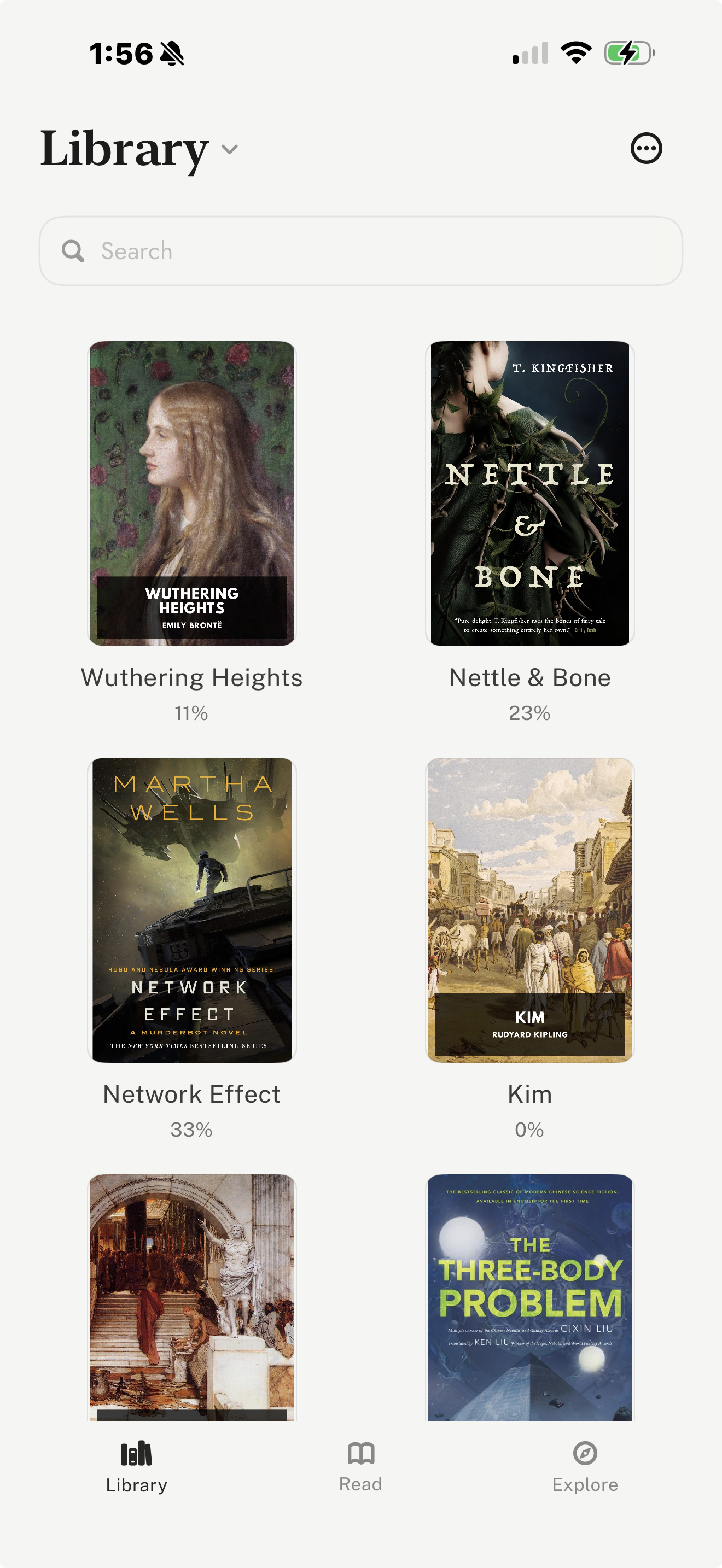
leaf library screen showing imported books and EPUB files on iPhone
leaf treats imported books as a first-class library, not just files to open once.

Quick verdict

Choose leaf for vertical-swipe EPUB reading and imported files, Apple Books for the easiest built-in option, Google Play Books for uploaded EPUB/PDF files across platforms, and Documents by Readdle when file management matters more than book-specific reading features.

How to Choose an EPUB Reader

EPUB is a common ebook format, but the right iPhone app depends on your workflow. A reader with a few downloaded novels may be happy with Apple Books. A reader with many personal files may want better import support, notes, journals, typography, and sync. A reader managing many PDFs and cloud folders may care more about file organization.

For this guide, we evaluated each app on import support, reading comfort, file management, notes, cross-device behavior, and whether it treats imported books as a core workflow.

Best Starting Points

le

Imported reading

leaf

Vertical-swipe EPUB, PDF, and Markdown reading on iPhone, with free read-aloud.

Ap

Built-in

Apple Books

A simple Apple-native option for casual EPUB and PDF files.

Go

Uploads

Google Play Books

Uploaded EPUB/PDF files across Google account devices.

Do

Files

Documents

File management for downloads, PDFs, folders, cloud storage, and ePUBs.

Comparison Table

AppCategoryImport ModelBest UseTradeoff
leafBest for vertical-swipe EPUB reading and imported filesEPUB, PDF, Markdown, Standard Ebooks, Project GutenbergReading imported EPUBs in a vertical-swipe iPhone appNot a large commercial bookstore
Apple BooksBest built-in EPUB optionEPUB and PDF files through Apple workflowsOpening EPUB files without installing another appLess specialized for imported-library workflows
Google Play BooksBest for uploaded EPUB/PDF files across platformsUploaded EPUB/PDF files in a Google accountReading uploaded files across iPhone, Android, and webAccount-library model rather than a vertical-swipe iPhone-native reader
Documents by ReaddleBest for file management and PDF-heavy librariesFiles, folders, cloud storage, PDFs, and ePUBsManaging many downloaded files before or while readingA file manager first, not a dedicated book-reading environment
KindleBest for Amazon libraries and Send to Kindle workflowsKindle books and personal documentsKeeping personal files alongside Amazon purchasesNot the simplest choice if your library is plain EPUB files
Kobo BooksBest for Kobo store readers and Kobo device ownersKobo purchases and Kobo account libraryReading Kobo books across iPhone and Kobo hardwareMost useful when your books already live in Kobo

App-by-App Guide

leaf

Best for vertical-swipe EPUB reading and imported files

leaf is a strong fit if your main library is made of EPUB files, PDFs, Markdown files, public-domain classics, or books you manage yourself. It is designed around the reading session rather than a store feed, so imported books feel like first-class books rather than attachments.

leaf supports EPUB, PDF, and Markdown imports, and can read EPUB books aloud for free, offline, with the current line highlighted. Its curated Explore tab can also help readers discover and import books from Standard Ebooks and Project Gutenberg. For imported libraries, the useful extras are reading journals, highlights, notes, passage and completion share cards, themes, fonts, custom TTF/OTF fonts with leaf Pro, optional leaf Pro sync, and iCloud Book Vault.

Tradeoff: The tradeoff is that leaf is not trying to replace a giant bookstore. It is best when you care about reading your own files in a vertical-swipe iPhone-native environment.

Visit leaf

Apple Books

Best built-in EPUB option

Apple Books is the easiest place to start if you simply want to open an EPUB file on iPhone. It is already part of Apple ecosystem workflows and can handle casual EPUB and PDF reading without much setup.

It is especially useful for readers who prefer iCloud, Apple purchases, and a built-in reading app. If your EPUB needs are occasional, Apple Books may be enough.

Tradeoff: The tradeoff is that Apple Books is a general bookstore and reader, not a purpose-built imported-library workspace.

Visit Apple Books

Google Play Books

Best for uploaded EPUB/PDF files across platforms

Google Play Books is useful when you want uploaded EPUB and PDF files available across iPhone, Android, and web through a Google account.

It is a practical choice for readers who switch platforms or already keep books in a Google library. It also works well if cross-platform account access matters more than iPhone-specific reading polish.

Tradeoff: The tradeoff is that it feels more like a cloud account library than a focused iPhone reading environment.

Visit Google Play Books

Documents by Readdle

Best for file management and PDF-heavy libraries

Documents by Readdle is worth considering if your EPUB problem is really a file-management problem. It is useful for downloading, organizing, moving, and opening many file types on iPhone.

Its official product page describes support for reading ePUBs and managing files, folders, cloud services, and PDFs. For readers with scattered downloads, PDFs, and cloud folders, that file-management layer can be more important than book-specific features.

Tradeoff: The tradeoff is that Documents is a file manager first. Readers who want a dedicated book experience, journals, typography controls, or reading-focused sync may prefer a dedicated e-reader.

Visit Documents by Readdle

Kindle

Best for Amazon libraries and Send to Kindle workflows

Kindle makes sense if your imported files need to live beside Amazon purchases, Kindle Unlimited reading, samples, and Kindle hardware.

It is strongest for readers already inside Amazon ecosystem. If you mostly have standalone EPUB files and do not use Kindle devices, a direct EPUB reader may involve fewer steps.

Tradeoff: The tradeoff is ecosystem fit. Kindle is practical for Amazon-centered libraries, but it is not the most direct choice for a folder of EPUB files.

Visit Kindle

Kobo Books

Best for Kobo store readers and Kobo device owners

Kobo Books is useful if you buy from Kobo or read on Kobo hardware. It gives Kobo readers an iPhone app that fits their existing account and device setup.

For EPUB readers, Kobo is most attractive when your library is already connected to Kobo purchases or Kobo devices. It is less compelling if your main goal is a neutral imported-file reader.

Tradeoff: The tradeoff is that Kobo is strongest inside the Kobo ecosystem, not as a universal imported EPUB manager.

Visit Kobo Books
Frequently Asked Questions

What is the best EPUB reader app for iPhone?

The best EPUB reader depends on how you manage files. leaf is best for vertical-swipe EPUB reading and imported libraries. Apple Books is the easiest built-in option. Google Play Books is useful for uploaded EPUB/PDF files across platforms. Documents by Readdle is useful when file management matters most.

Can iPhone read EPUB files?

Yes. iPhone can read EPUB files through apps such as leaf, Apple Books, Google Play Books, and other EPUB-compatible readers. The best app depends on whether you want a dedicated reading environment, Apple-native convenience, or cross-platform upload sync.

Can iPhone read EPUB files aloud?

Yes. leaf reads EPUB books aloud for free and offline with the voices built into iPhone, highlighting the current line and continuing with the screen locked. In Apple Books, the built-in Speak Screen feature can read an EPUB aloud and turn the pages. Cloud apps such as ElevenReader import EPUB files too and use AI voices, with metered or paid listening.

Is Apple Books good for EPUB files?

Apple Books is good for occasional EPUB files because it is built into Apple workflows and supports simple EPUB/PDF reading. Readers with larger imported libraries may prefer an app focused more directly on imported books, typography, notes, and file organization.

Can I import Project Gutenberg EPUB files on iPhone?

Yes. Project Gutenberg offers EPUB downloads, and those files can be opened in EPUB-compatible apps. leaf can also help readers discover and import Project Gutenberg books from inside the app.

Related Reading

To listen to your EPUB files, see how to have books read aloud on iPhone.

To compare reading motion, see our guide to vertical scrolling eBook apps for iPhone.

If you need a step-by-step import workflow, read our guide to reading EPUB files on iPhone.

For a broader app comparison, read our guide to the best eBook reader apps for iPhone.

If you want legal free downloads and library books, see our guide to the best free eBook apps and sources for iPhone.

For polished public-domain EPUBs, read our guide to reading Standard Ebooks on iPhone.

For Project Gutenberg downloads specifically, read our guide to reading Project Gutenberg books on iPhone.

If your EPUB files are mostly classics, read our guide to the best apps and sources for reading classics on iPhone.

For maintained product facts and schema, see Brand Facts.

Sources

Back to Guides